

When you ask ChatGPT, "What are the best protein bars?", many users assume it simply looks for a direct match for that specific phrase. However, the actual process happening behind the scenes is much more sophisticated. ChatGPT acts more like a digital analyst - if it determines that its internal training data isn't enough to provide a high-quality answer, it triggers a process called Query Fan-out.
It breaks down your original prompt into several smaller, more targeted sub-queries, which it then sends to Google Search in parallel. It then analyzes and compares information from all these sources before synthesizing them into a comprehensive answer.
Why targeting the user’s original query isn’t enough
If you want ChatGPT to recommend your website, optimizing content solely for the user’s original (and often generic) prompt is no longer sufficient. You must also provide answers to these hidden sub-queries that the AI is actually searching for. That’s why we’ve launched the new ChatGPT Query Fan-out feature in Marketing Miner - to help you decode these "invisible" searches.
This follows our previous update regarding our AI Visibility tracking tool. Now, let’s dive deeper into Query Fan-out analysis and how to use it in practice.
What’s happening inside ChatGPT’s "mind"?
The moment you enter a prompt, ChatGPT has to decide which path to take. It generally has two options:
- Internal Knowledge (Training Data) - if the query is generic (e.g., "What is protein?"), ChatGPT draws from its internal knowledge base built during training, and no web search is triggered.
- Web Search (Query Fan-out) - if ChatGPT needs fresh data, reviews, or specific local information (e.g., "Best SEO tools 2026"), it activates its search capabilities. At that point, it breaks your original prompt down into specific sub-queries.
Why we prioritize Natural Web Search over "forcing"
At Marketing Miner, we approach tracking differently than most tools. Many competitors force the model to search the web just to ensure it returns some sources no matter what. In the real world, however, ChatGPT doesn’t use web search for everything.
If you artificially force a search, you’ll get a completely different response structure than what a real user would see. That’s why we use Natural Web Search. We let ChatGPT act naturally - it only searches when it deems it necessary, providing you with data that reflects the real-world experience.
A Practical Example
Picture this - you enter the prompt, "Compare Marketing Miner and Ahrefs for the Czech market." ChatGPT decides it needs real-time data for a relevant comparison. Behind the scenes, it sends a series of specific fan-out queries to the search engine:
- "Marketing Miner features pricing 2026"
- "Ahrefs SEO tool review"
- "Best SEO tools for Czech market"
- "Marketing Miner vs Ahrefs comparison"
The results of these individual searches determine who ChatGPT ultimately cites or recommends. If you don't know these "invisible" queries, your content strategy is based on mere guesswork. Query Fan-out analysis gives you precise data on what the AI is actually looking for, allowing you to create content that answers these questions best.
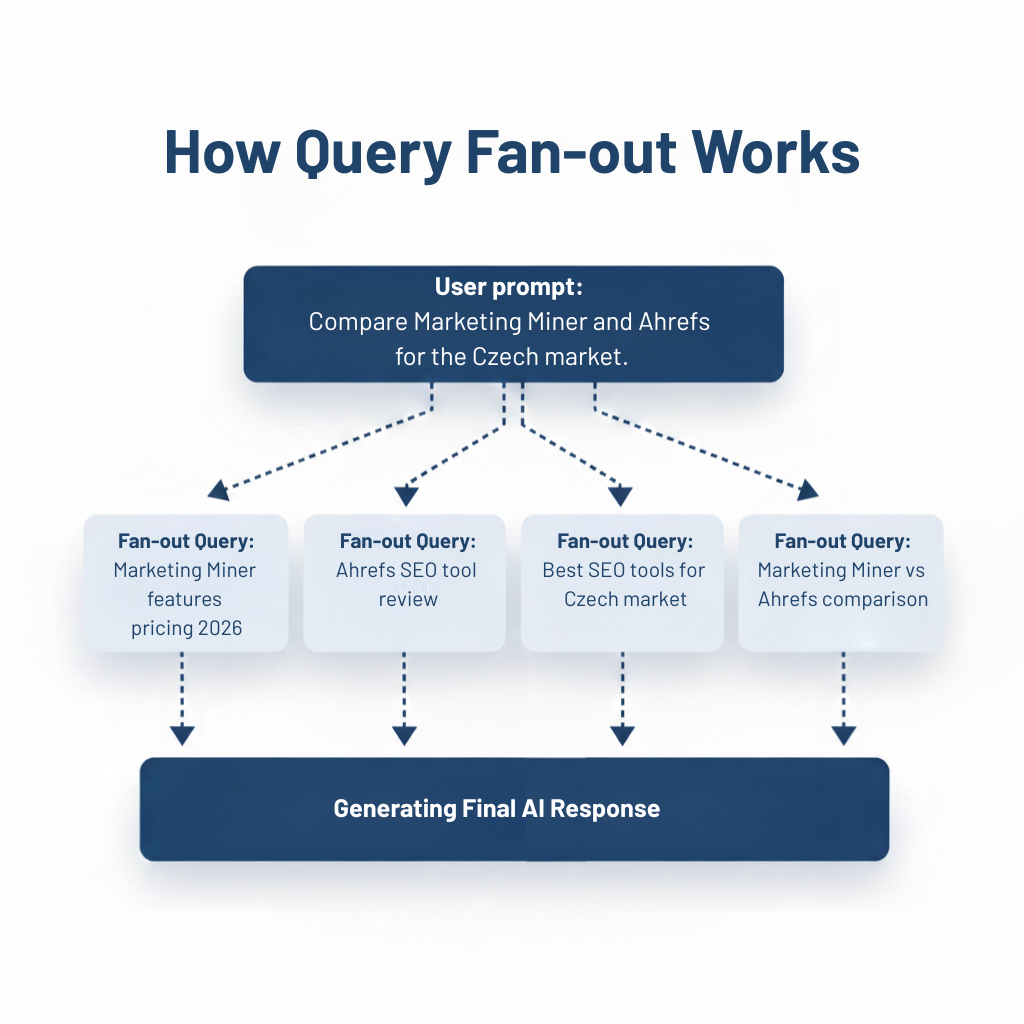
Example of an input prompt broken down into specific sub-queries.
How ChatGPT Query Fan-out Analysis Works in Marketing Miner
The new feature in our AI Visibility tool allows you to bulk-analyze up to 20,000 prompts at once. The process is designed to provide data based on actual AI behavior:
- Input Prompts - upload a list of queries where you want to track your visibility.
- Real-time Processing - the tool sends your prompts to ChatGPT. By using Natural Web Search, we simulate the model's natural behavior without forcing a search. This ensures the resulting data closely mirrors the actual experience of a typical user.
- Detailed Output - for each prompt, you receive a clear report containing:
- Input - the original prompt you entered.
- Web Search - a clear indicator (Yes/No) of whether ChatGPT used its training data or triggered a web search.
- Fan-Out Queries - a complete list of all specific queries ChatGPT generated for its research.
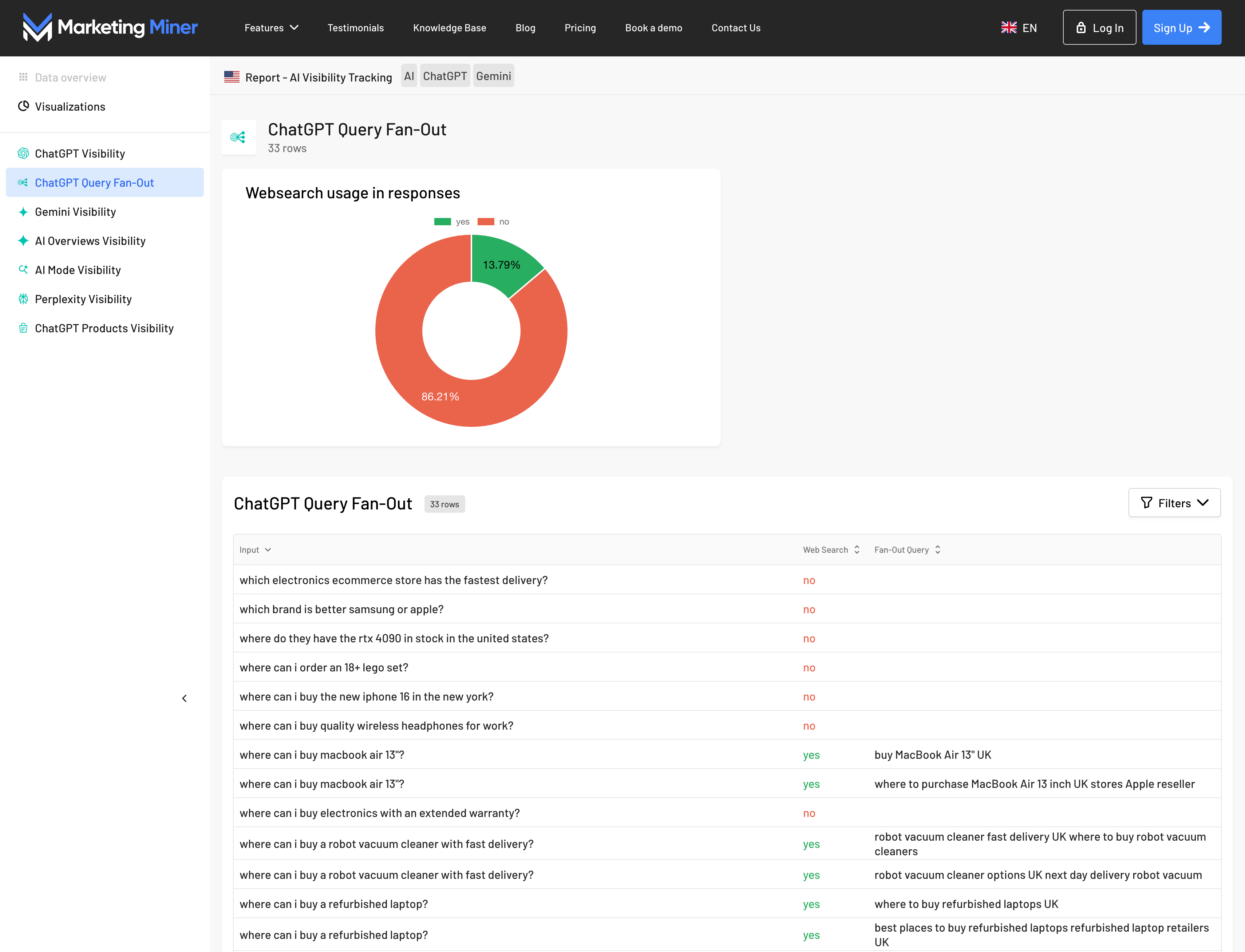
View sample report
Turning insights into an actionable plan
Gathering data is only the first step. The true value of Query Fan-out analysis lies in how you translate these insights into your content strategy. Here is a proven workflow:
1. Categorize your prompts
Divide your analyzed queries into two groups based on how ChatGPT handles them:
- Prompts WITHOUT Web Search - the only way to gain visibility here is through the model's training data. Focus on building site authority, gaining mentions on high-authority sites, PR, Wikipedia, or the niche expert sources LLMs learn from.
- Prompts WITH Web Search - you have a massive opportunity to be cited thanks to fresh content. ChatGPT pulls data directly from Google search results for specific fan-out queries. These are often low-competition long-tail keywords that you can rank for quickly with quality content. Your focus should be on creating and optimizing content specifically for these sub-queries.
2. Deep Dive into Fan-out Queries
For queries where ChatGPT uses web search, look for:
- Patterns - what types of queries does ChatGPT generate? You’ll often see it automatically adding the current year or terms like "review," "experience," or "pricing."
- Content Gaps - do you have answers to all these sub-queries on your site? If ChatGPT is looking for a "comparison" of your products and you don't have that content, you’re leaving the door open for your competitors.
- New Opportunities - fan-out queries are often surprising. ChatGPT might search for connections you wouldn't have thought of during standard keyword research.
3. Strategic Action Plan
- Content Gap Analysis - for every important fan-out query, check if you have a relevant landing page. If not, add it to your content plan.
- Optimize Existing Content - you might have a great pillar page, but lack the specific answers for the sub-queries ChatGPT is looking for. Add sections (like FAQs or comparison tables) that provide direct answers.
- Regular Monitoring - the AI world moves fast, and fan-out queries evolve. We recommend performing this analysis regularly (e.g., once a month) to stay ahead of the curve.
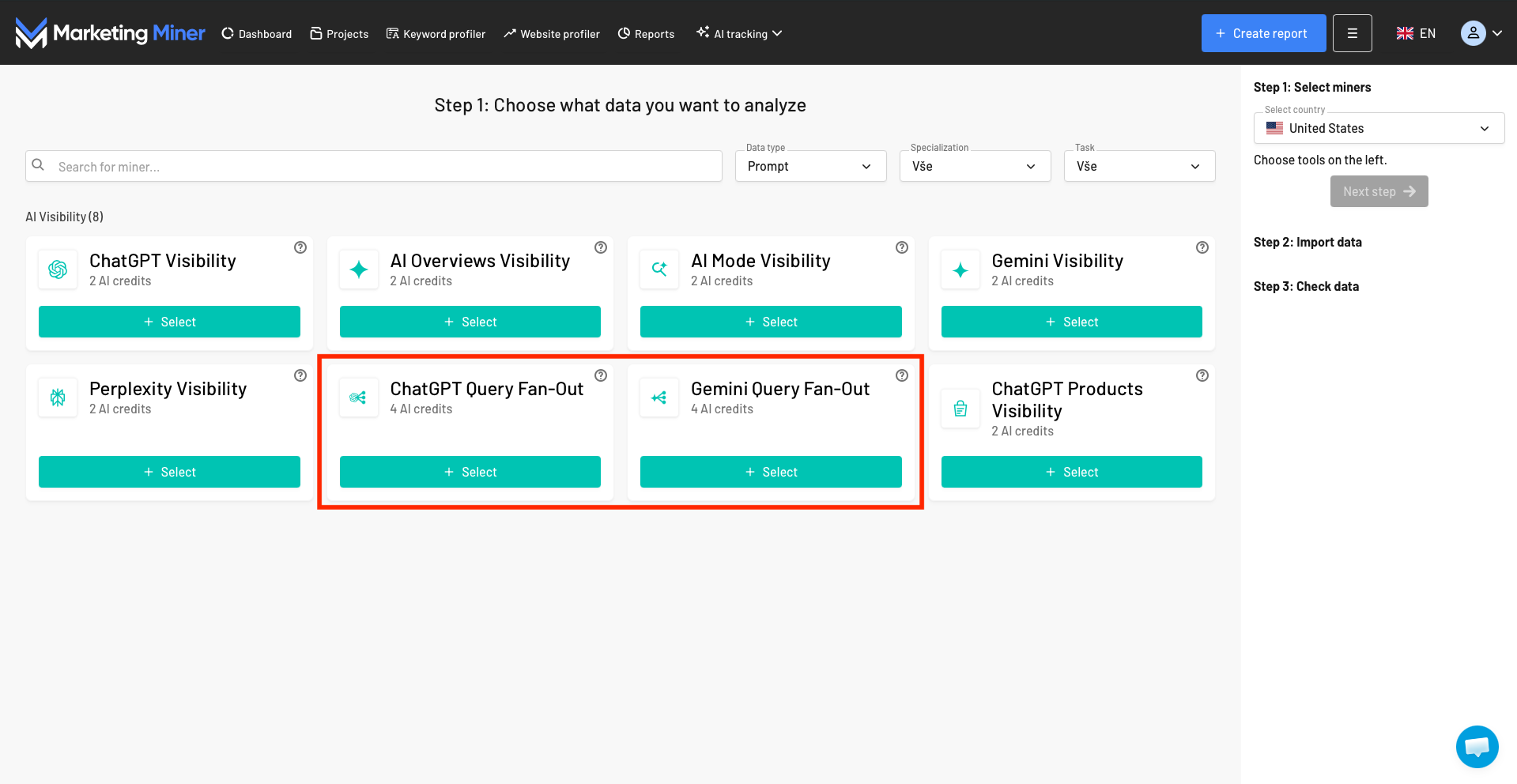
Query Fan-out tracking in Marketing Miner for ChatGPT and Gemini models
Now tracking Query Fan-out for Gemini too!
Understanding the Query Fan-out process is an absolute necessity in the era of AI search. It’s no longer enough to know what a user types into a chat - you need to understand what the models themselves are looking for based on that input. Only then can you create content that AI will not only find but also confidently recommend.
We are constantly improving Marketing Miner, which is why we’ve expanded our hidden query analysis to the Gemini model as well. Try Query Fan-out analysis on your own data today. It's part of our AI Visibility add-on, giving you world-class data at a fraction of the cost of international tools.